Declensions Management
Overview
The Declensions Management is designed to help users manage word variations (like singular/plural forms) within the system. Declensions are groups of related words that should be treated as equivalent during search operations. This allows administrators to create, edit, and remove declension groups easily, ensuring better search accuracy. Declensions work in conjunction with search configuration and rules management for comprehensive search optimization.
Why Use Declensions?
When the system performs a search, it will understand that different forms of a word mean the same thing. For example, if you search for "book", the system will also show results containing "books" or "booklet" if they're grouped together.
This gives you full control over: - Which word variations should be treated as equivalent during search, affecting search results
- Adding custom declension groups based on your product catalog
- Editing groups to add or remove word forms
- Removing declension groups that are no longer needed
Real-World Example: Instead of users having to search separately for "shoe" and "shoes", grouping them means one search finds all results.
Key Sections Of The Page
1. Language Selector (Top Right)
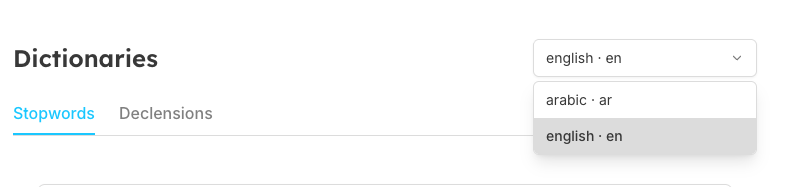
You can choose the language (e.g., English -- en) for which you want to manage declensions. Each language maintains its own separate list, which integrates with your search configuration language settings.
2. Search Input and Seekora Declension Info Box
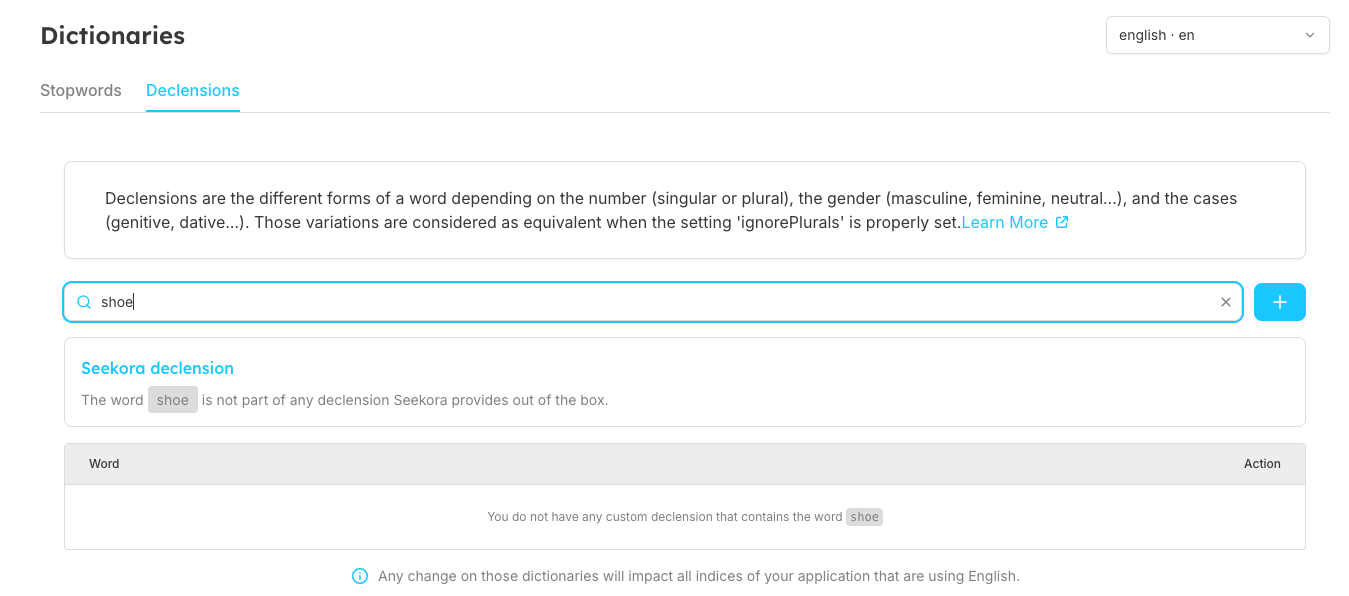
The search input allows you to:
- Search for existing words - Check if a word is already part of a declension group
- Add new declension groups - Create groups for words not yet in the system
- Get real-time feedback through the Seekora declension info box
Info Box States:
- Empty search: "Search for a word to see if Seekora includes it in a declensions list out of the box"
- Word found: Shows existing declension group
- Word not found: "The word '[word]' is not part of any declension Seekora provides out of the box" - allows you to create new group
4. Word Groups Table
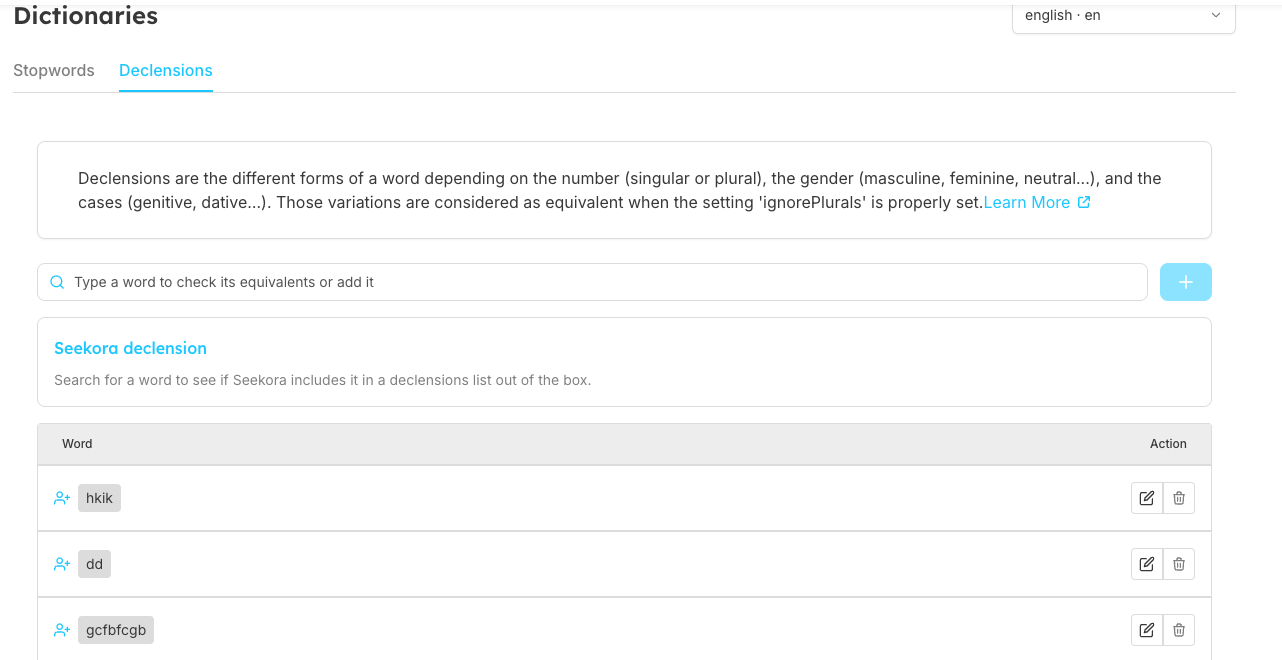
This table shows all declension groups with the following details:
Table Columns:
- Word column: Shows all words in each declension group as tags
- Action column: Contains edit and delete buttons for each group
Table Features:
- Pagination: Navigate through multiple pages of declension groups
- Pending changes indicator: Shows unsaved modifications
- Bulk operations: Handle multiple changes before saving
Action Buttons
Available Actions:
- Edit Icon : Click to modify the word group (add/remove words)
- Delete Icon : Click to remove the entire group permanently
Performing Multiple Actions At Once
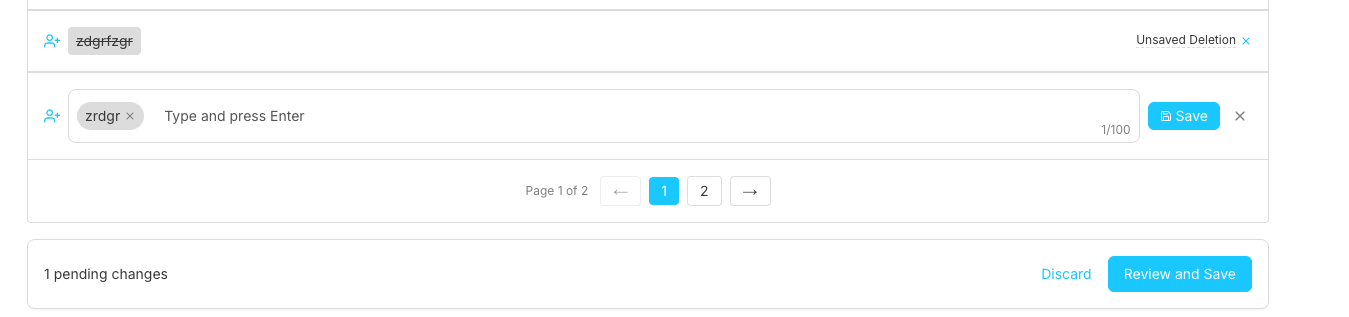
You can perform Add, Edit, Remove actions at the same time before saving. This bulk operation feature works similar to rules management and stopwords management.
Bulk Operations Workflow:
- Make multiple changes (create, edit, delete groups)
- Review all changes using "Review and Save" button
- Confirm or discard changes in the review dialog
- Save all changes at once
Understanding The Tag Input
How It Works
The tag input lets you enter multiple words in a user-friendly way.
Input Methods:
- Type and press Enter - Add words one by one
- Type and press Space - Quick word addition
- Remove tags - Click X on individual word tags
- Edit existing groups - Modify word lists in existing declensions
Visual Feedback:
- Word count indicator - Shows "1/100" progress
- Tag styling - Words appear as removable tags
- Real-time validation - Instant feedback on input rules
Validation Rules
- 📌 No Spaces in Words: Each word must be a single term without spaces.
- 📌 Unique Words in Group: Duplicate words are not allowed.
- 📌 Case Insensitive: The system treats "Book" and "book" as the same word.
Frequently Asked Questions
When should I use declensions for product variations?
Use declensions when you want singular and plural forms of products to return the same search results. This enhances the search experience for users.
Examples:
- dress, dresses
- shoe, shoes
- bag, bags
How do I handle irregular plural forms?
For words with non-standard plurals, create groups including both forms. This is essential since the system's automatic plural detection may not catch irregular forms.
Examples:
- person, people
- child, children
- mouse, mice
- foot, feet
Can I group different spellings of the same word?
Yes,declensions help handle regional spelling variations, improving search results for international users.
Examples:
- color, colour
- organize, organise
- center, centre
How do I link related terms or synonyms?
You can group related search terms that should return similar results. However, consider using rules management for more complex synonym handling.
Examples:
- phone, telephone, mobile
- laptop, notebook, computer
- sofa, couch
Related Features
- Rules Management: Advanced query handling and search customization
- Stopwords Management: Configure words to ignore during search
- Search Configuration: Overall search behavior and settings
- Browse Interface: Where users experience the effects of declensions
- Search Analytics: Monitor declension effectiveness and usage patterns