Overview
The Billing Management gives you clear visibility into your account’s usage and costs. The billing section lets you review usage, track credits, manage payments, and set up billing alerts ensuring complete control over your account expenses.
Why Use Billing Management?
Billing management provides essential financial control capabilities for:
- Usage Monitoring - Track API calls, records, and service consumption
- Cost Control - Monitor credit usage and spending patterns
- Payment Management - Handle subscriptions, orders, and invoices
- Budget Planning - Set alerts and limits to prevent overspending
- Financial Reporting - Generate detailed usage and billing reports
Key Benefits:
- Transparent Billing: Clear visibility into all charges and usage
- Proactive Monitoring: Real-time usage tracking and alerts
- Flexible Payments: Multiple payment options and billing cycles
- Detailed Records: Comprehensive history of all transactions
- Cost Optimization: Usage insights to optimize service consumption
Accessing Billing Management
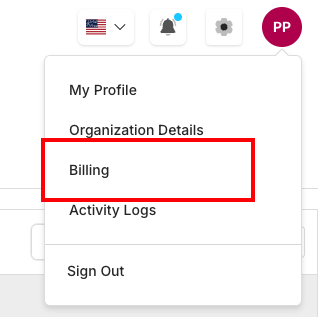
Profile Dropdown Access
To access billing management:
- Click Profile Avatar: Located in the top-right corner of the dashboard
- Select Billing: Choose from the dropdown menu options
- Navigate Tabs: Use the billing interface tabs for different functions
Complete Billing Reference
| Category | Item/Feature | Purpose/Cycle Info | Documentation/Features | Important Notes |
|---|---|---|---|---|
| Navigation Tabs | Overview | Main dashboard with usage summary and credit balance | Real-time usage metrics, credit status, subscription details | Current page |
| Navigation Tabs | Usage Details | Detailed usage breakdown and analytics | Period-specific usage data, store filtering, consumption trends | Monitor usage |
| Navigation Tabs | Orders | Payment orders and transaction history | Order management, payment status, transaction records | Payment tracking |
| Navigation Tabs | Invoices | Invoice generation and management | Download invoices, billing history, payment records | Download records |
| Navigation Tabs | Alerts | Usage alerts and billing notifications | Threshold management, automated alerts, budget controls | Set notifications |
| Billing Cycle | Start Date | Beginning of current billing period | Dashboard and credit management - View Details | Monitor regularly |
| Billing Cycle | End Date | End of current billing period | Consumption analytics and reporting - View Details | Set up alerts |
| Billing Cycle | Billing Cycle | Monthly or custom billing periods | Payment processing and order history - View Details | Enable notifications |
| Billing Cycle | Auto Renewal | Automatic subscription renewal status | Invoice generation and downloads - View Details | Compliance aware |
| Configuration | Alerts Setup | Alert configuration and management | Usage alerts and notifications - View Details | Configure thresholds |
Overview Dashboard Components
Billing Cycle & Credit Information
The top section displays your current billing cycle details and credit information:
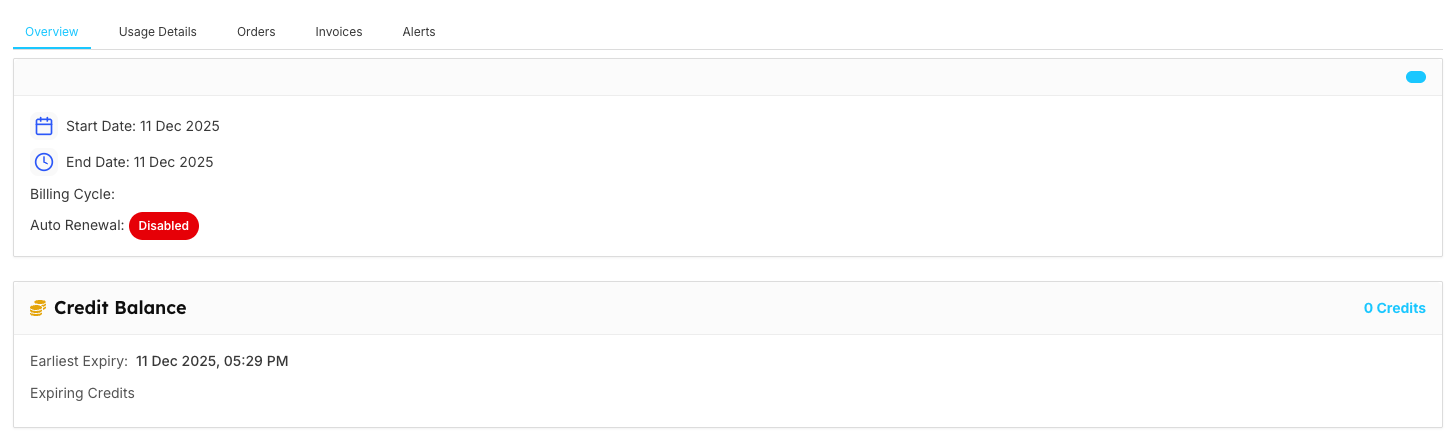
| Category | Field/Component | Description | Example/Status |
|---|---|---|---|
| Billing Cycle | Start Date | Beginning of current billing period | 11 Dec 2025 |
| Billing Cycle | End Date | End of current billing period | 11 Dec 2025 |
| Billing Cycle | Billing Cycle | Frequency of billing | Monthly/Quarterly/Annual |
| Billing Cycle | Auto Renewal | Automatic renewal status | Enabled/Disabled (Red badge if disabled) |
| Credit Balance | Credit Balance | Available credits for API usage | 0 Credits (example) |
| Credit Balance | Earliest Expiry | Next credit expiration date | 11 Dec 2025, 05:23 PM |
| Credit Balance | Expiring Credits | Credits approaching expiration | Shows credits near expiry |
Complete Usage & Subscription Information
Comprehensive overview of usage tracking, summary metrics, and subscription limits:
| Section | Service/Metric | Description | Current Status/Limit |
|---|---|---|---|
| Usage Overview | Stores | Number of stores created | 1/0 with 0.0% progress |
| Usage Overview | Records | Total records stored | 0/0 with 0.0% progress |
| Usage Overview | Max Record Size | Maximum record size limit | 0/0 with 0.0% progress |
| Usage Overview | API Calls | API requests made | Shows usage with percentage |
| Usage Summary | Search Requests | Total API search requests | 83 |
| Usage Summary | Records Processed | Total records processed | 0 |
| Usage Summary | Total Credits Used | Credits consumed this period | 0 |
| Usage Summary | Period | Current billing period | This month |
| Subscription Limits | Stores | Store creation allowance | 0 limit |
| Subscription Limits | Records | Record storage limit | 0 limit |
| Subscription Limits | Max Record Size | Individual record size limit | 0 limit |
| Subscription Limits | API Calls | API request limit | 0 limit |
| Subscription Limits | Synonyms | Synonym management limit | 0 limit |
| Subscription Limits | Analytics Rules | Rule creation limit | 0 limit |
| Subscription Limits | Stopwords | Stopword management limit | 0 limit |
| Subscription Limits | Query Suggestions | Query suggestion limit | 0 limit |
| Subscription Limits | Analytics Events | Event tracking limit | 0 limit |
| Subscription Limits | Analytics History | Historical data retention | 0 limit |
| Subscription Limits | Credits | Credit allocation | 0 limit |
| Subscription Limits | Team Members | Team size limit | 0 limit |
| Account Action | Upgrade Button | Available at bottom for plan upgrades | Click to upgrade subscription |
Monitoring Best Practices
Regular Checks
- Daily: Monitor credit balance and usage trends
- Weekly: Review usage patterns and optimization opportunities
- Monthly: Analyze billing reports and plan adequacy
Alert Configuration
- Credit Alerts: Set notifications at 75% and 90% credit consumption
- Usage Alerts: Configure warnings before reaching service limits
- Renewal Alerts: Enable notifications for upcoming renewals
Cost Optimization
- Usage Analysis: Regular review of service consumption patterns
- Plan Evaluation: Assess if current plan matches actual usage
- Credit Management: Optimize credit purchases to minimize waste