Alerts
Overview
The Alerts Management section helps you stay informed about important billing events, usage limits, and account activity (view current status in Billing Overview). You can set custom alerts and receive automated notifications, ensuring you never miss critical updates related to your account.
Alerts Dashboard
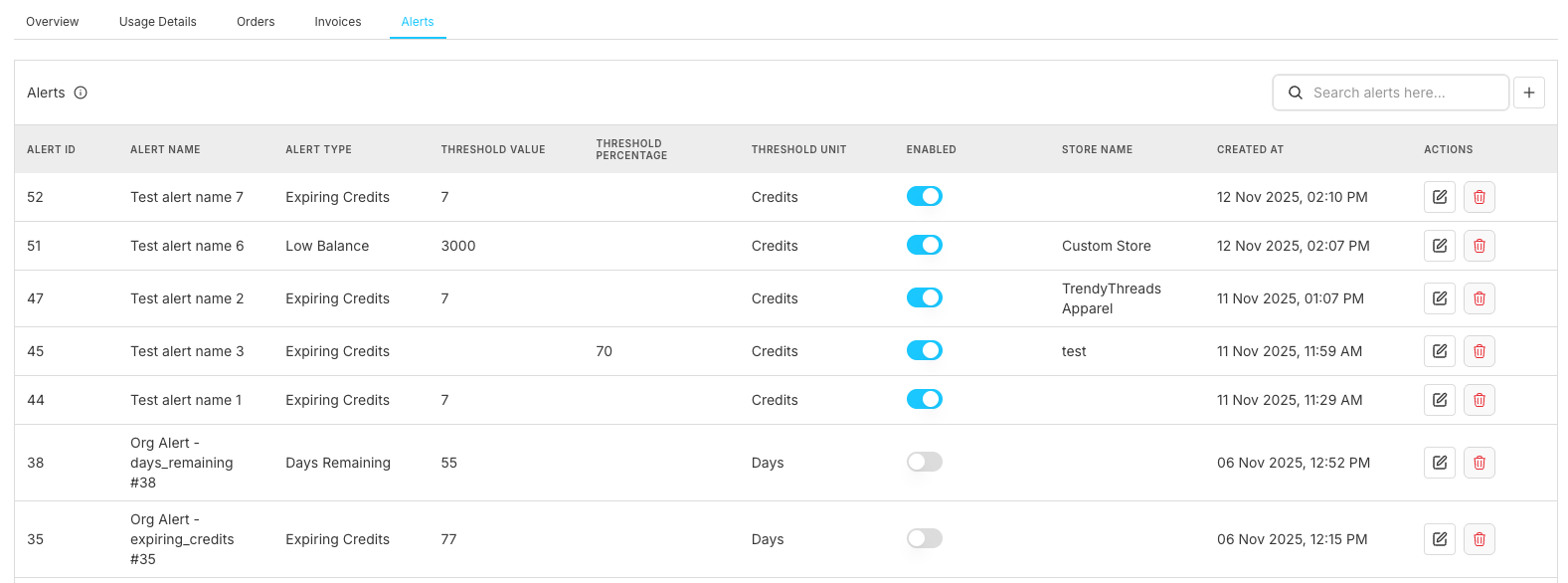
The alerts management interface provides comprehensive monitoring and configuration capabilities with an intuitive table-based layout and easy alert creation access.
Alerts Table Structure
The alerts section displays a comprehensive management table with the following columns:
| Column | Description | Purpose |
|---|---|---|
| Alert ID | Unique identifier for each alert rule | Alert tracking and management |
| Alert Name | Descriptive name for the alert | Easy identification and organization |
| Alert Type | Category of alert (Expiring Credits, Low Balance, etc.) | Alert classification |
| Threshold Value | Trigger value for alert activation | Monitoring parameters |
| Threshold Unit | Unit of measurement (Credits, Days, etc.) | Measurement context |
| Enabled | Alert activation status toggle | Control alert functionality |
| Store Name | Associated store for store-specific alerts (manage in Store Configuration) | Store-level monitoring |
| Created At | Alert creation timestamp | Alert history tracking (detailed in Activity Logs) |
| Actions | Available management operations (Edit, Delete) | Alert administration |
Alert Configuration
Adding New Alerts
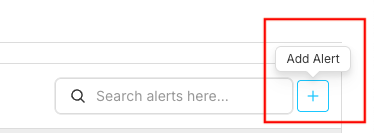
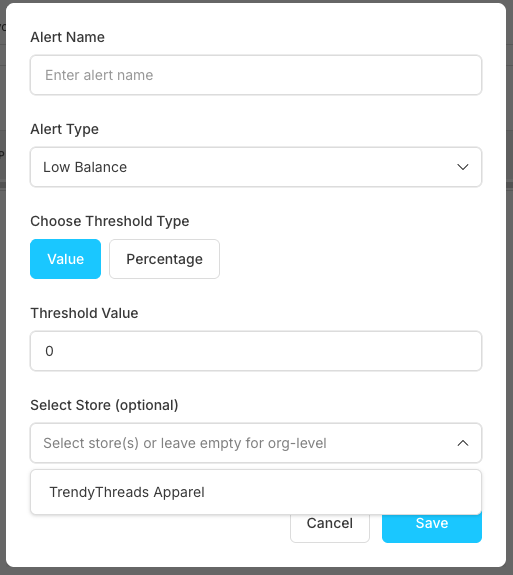
The "Add Alert" includes the configuration options:
Form Fields Configuration
| Field | Description | Options/Format |
|---|---|---|
| Alert Name | Descriptive identifier for the alert | Free text input (e.g., "Low Balance Warning") |
| Alert Type | Category of monitoring alert | Dropdown: Low Balance, High Usage, Payment Due, etc. |
| Choose Threshold Type | Trigger mechanism for the alert | Toggle: Value or Percentage |
| Threshold Value | Specific trigger amount/number | Numeric input (e.g., 0, 100, 1000) |
| Select Store | Target store for alert monitoring | Dropdown: Specific store or organization-level |
Editing Existing Alerts
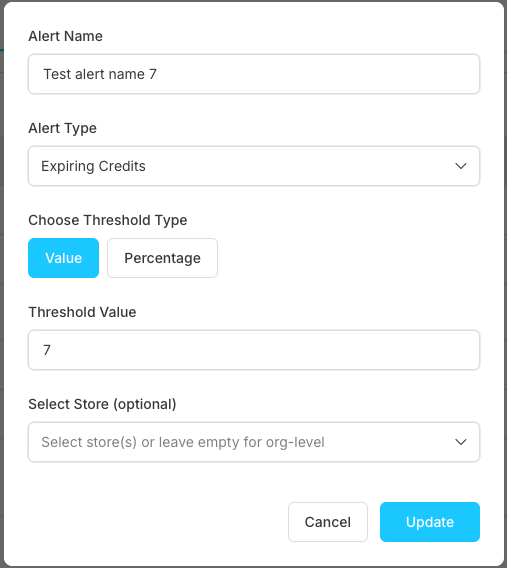
Click the edit button next to any alert to modify its configuration:
Threshold Management
Configure alert triggers:
| Category | Absolute Values | Percentage-based | Time-based |
|---|---|---|---|
| Description | Fixed numerical triggers | Proportional triggers | Schedule-based alerts |
| Example | $1000 spending limit | 80% of credit balance | Monthly usage reports (monitor in Usage Details) |
Compound Conditions: Multiple criteria alerts (e.g., High usage + low credits)
Best Practices
Alert Strategy
- Start Simple: Begin with basic essential alerts
- Monitor Effectiveness: Regularly review alert performance
- Avoid Alert Fatigue: Balance coverage with notification volume
- Regular Review: Periodically assess and update alert configurations
Threshold Management
- Business-Aligned Thresholds: Set limits based on business needs
- Historical Analysis: Use past data to inform threshold settings (analyze in Usage Details)
- Gradual Adjustments: Make incremental threshold changes
- Seasonal Considerations: Adjust for business cycle variations
Frequently Asked Questions
How do I create my first alert?
Click the "+ Add Alert" button in the top right corner of the alerts dashboard. Fill in the alert name, select the alert type from the dropdown (like "Low Balance" or "Expiring Credits"), choose whether you want a value or percentage threshold, set your trigger value, and optionally select a specific store. Click "Save" to activate your alert.
Why am I not receiving alert notifications?
Check these common issues: ensure the alert is enabled (toggle should be blue), verify your notification settings in your account preferences, check your email spam folder, and confirm the threshold values are set appropriately.
Can I set different alerts for different stores?
Yes, when creating or editing an alert, you can select a specific store from the "Select Store" dropdown, or leave it empty to apply the alert at the organization level across all stores.
Related Features
Billing Monitoring
- Usage Details - Monitor usage patterns and historical data for threshold setting
- Orders Management - Track payment processing and billing events
- Invoices Management - Manage invoice notifications and payment alerts
System Configuration
- Notifications - Configure alert delivery preferences and email settings
- User Management - Set user permissions for alert management and billing access
- Activity Logs - Review alert creation and modification history