How to configure my store
Overview
The Configuration section is the central hub for managing all search-related settings and parameters within the Store management system. This powerful interface allows administrators to fine-tune search behavior, customize relevance algorithms, and optimize the search experience for end users. All configuration changes directly impact how products are indexed, searched, and displayed in search results. Monitor performance through Analytics and track changes via API Logs.
Why Use Configuration?
The Configuration section gives you complete control over search behavior and performance:
Real-World Example:
If you want to prioritize brand names in search results, you can configure the searchable attributes to give higher weight to the "brandName" field, ensuring branded searches return more relevant results. Monitor the impact using Analytics and test changes in Browse.
Key Configuration Sections
Configuration Item
Description
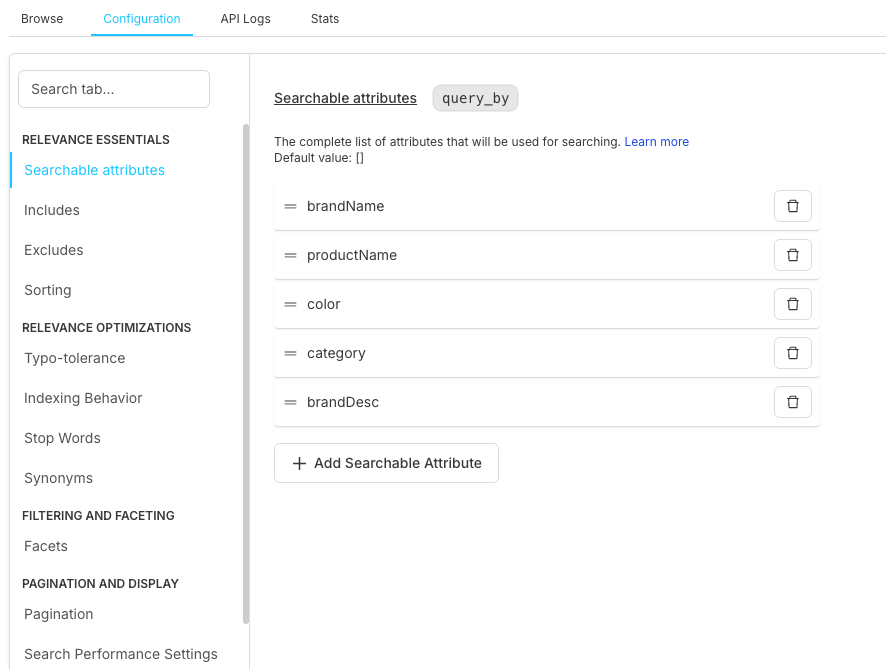
Searchable attributes
Fields used for searching and their priority ranking in search queries
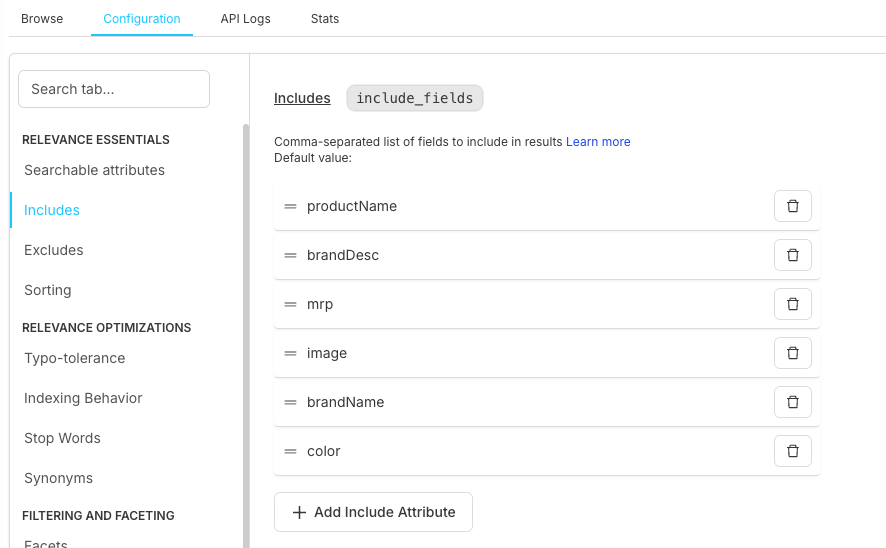
Includes
Fields to include in search results and API responses for data optimization
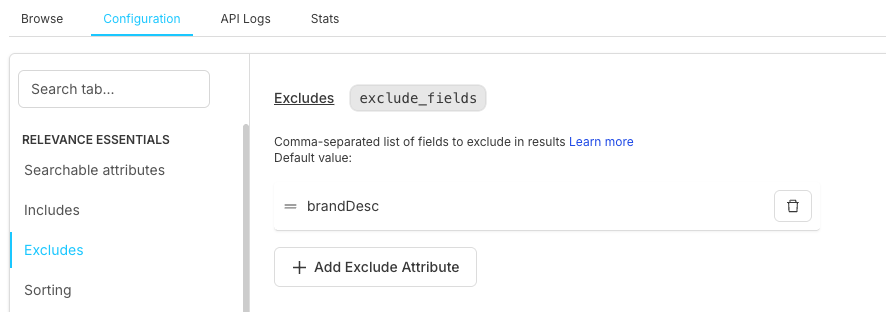
Excludes
Fields to exclude from results for privacy, security, and performance optimization
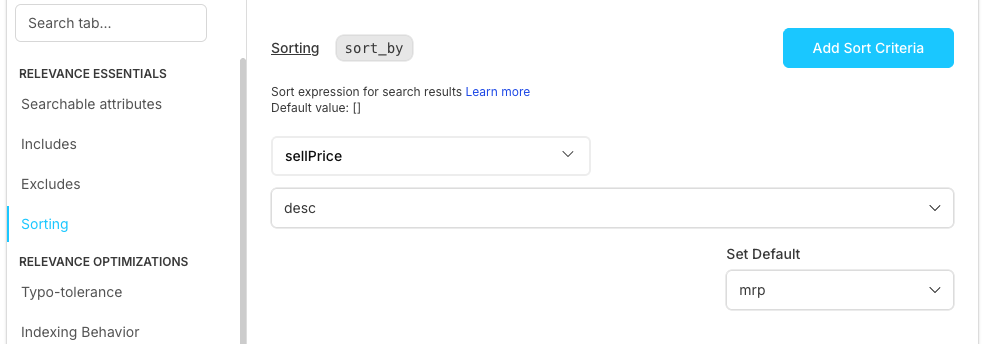
Sorting
Default and custom sort options with configurable criteria and direction preferences
Optimization Feature
Description
Typo-tolerance
Handle spelling mistakes and improve search recall with configurable tolerance levels
Indexing Behavior
Control how data is indexed, processed, and tokenized for optimal search performance
Stop Words
Words to ignore during search processing to improve relevance and performance
Synonyms
Alternative terms for search queries to expand matching and improve user experience
Facets
Filter options for users to narrow search results by categories, attributes, and values
Display Setting
Description
Pagination
Results per page settings and navigation controls for optimal user experience
Search Performance Settings
Timeout and performance configuration to balance speed with search quality (monitor response times in
API Logs and test in
Browse)
Result Highlighting
Highlight search terms in results to improve visibility and user understanding
Relevance Essentials
Searchable Attributes Configuration
Purpose: Define which product attributes can be searched and their priority order.
Attribute Ranking
Higher positioned attributes get more search weight and priority in relevance scoring
Query Matching
Controls which fields match user queries and participate in search operations
Search Relevance
Affects how results are ranked and determines the order of search results presentation
Attribute Name
Description
brandName
Product brand identifier and manufacturer information
productName
Product title/name and primary identification text
color
Product color variations and available color options
category
Product category classification and hierarchical grouping
brandDesc
Brand description and detailed brand information
Configuration Option
Description
Add Searchable Attribute
Add new searchable fields to expand search coverage and capabilities
Remove Attribute
Remove fields from search operations to optimize performance and relevance
Reorder Priority
Drag and drop to change ranking and adjust search weight priorities
Includes Configuration
Purpose: Specify which fields to include in search response data. Test field inclusion in Browse and monitor data usage via API Logs.
Field Selection
Choose specific fields to return in search responses for customized data delivery
Response Optimization
Reduce payload size and improve performance by limiting returned data
Data Control
Limit sensitive information exposure and maintain data privacy controls
productName
Product title and primary identification text
brandDesc
Brand description and detailed brand information
mrp
Maximum retail price and pricing information
image
Product image URLs and visual assets
brandName
Brand information and manufacturer details
color
Product color variations and available color options
Management Option
Description
Add Include Attribute
Include new fields in search responses to expand available data
Remove Field
Exclude fields from response to optimize performance and data privacy
Excludes Configuration
Purpose: Define fields to exclude from search responses. Test exclusion effects in Browse and verify data privacy through API Logs.
Data Privacy
Hide sensitive information and protect confidential data from exposure
Performance
Reduce response size and improve API performance by limiting data transfer
Security
Prevent data exposure and maintain security compliance standards
brandDesc
Internal descriptions and confidential brand information
internalId
System identifiers and internal database references
cost
Internal pricing data and confidential cost information
Sorting Configuration
Purpose: Configure default and available sorting options.
Default Sorting
Primary sort criteria (e.g., sellPrice) that determines initial result ordering
Sort Direction
Ascending (asc) or Descending (desc) order configuration for sort operations
Custom Sorts
Multiple sorting options and user-defined sort criteria for flexible result ordering
Fallback Sorting
Secondary sort criteria used when primary sorting values are identical
Configuration Option
Description
Add Sort Criteria
Add new sorting rules and custom sort options to expand ordering capabilities
Set Default
Define primary sort order and establish default sorting behavior for all searches
Configure MRP
Set maximum retail price sorting options and price-based ordering configurations
Relevance Optimizations
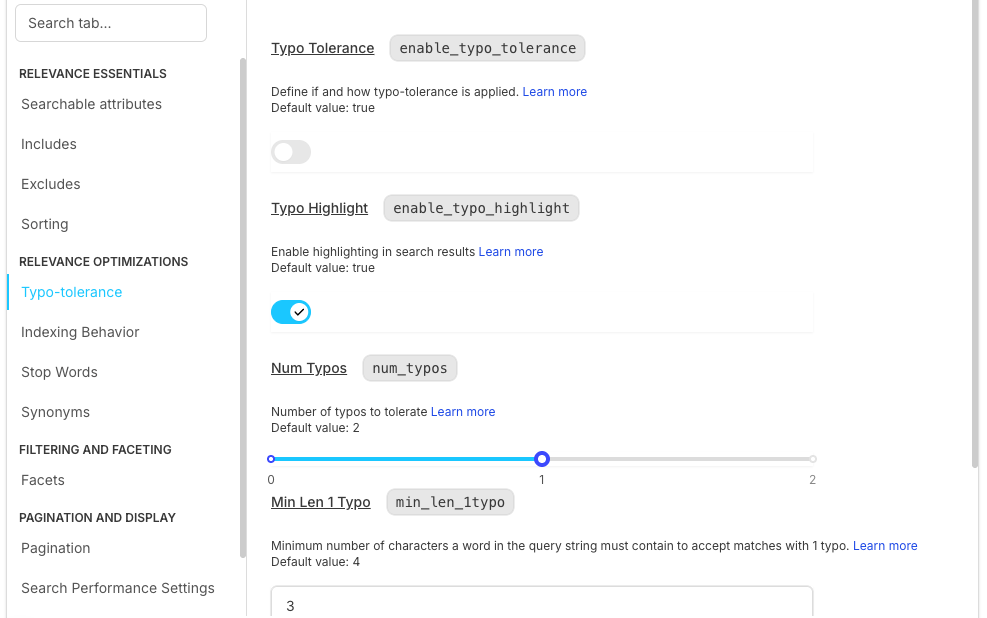
Typo Tolerance
Purpose: Handle spelling mistakes and improve search recall. Test typo corrections in Browse and monitor search patterns in Analytics.
Enable Typo Tolerance
Allow fuzzy matching to handle spelling mistakes and improve search recall
Typo Highlight
Enable highlighting of corrected terms to show users what was auto-corrected
Num Typos
Maximum number of typos to tolerate (default: 2) for balancing recall and precision
Min Len 1 Typo
Minimum characters for 1 typo tolerance (default: 4) to prevent false matches
Min Len 2 Typo
Minimum characters for 2 typos tolerance (default: 7) to maintain search accuracy
Performance Impact
Description
Improved Recall
Find products despite spelling errors, increasing successful search results and user satisfaction
Better UX
Users don't need perfect spelling, creating a more forgiving and user-friendly search experience
Balanced Precision
Avoid too many irrelevant results by maintaining optimal balance between tolerance and accuracy
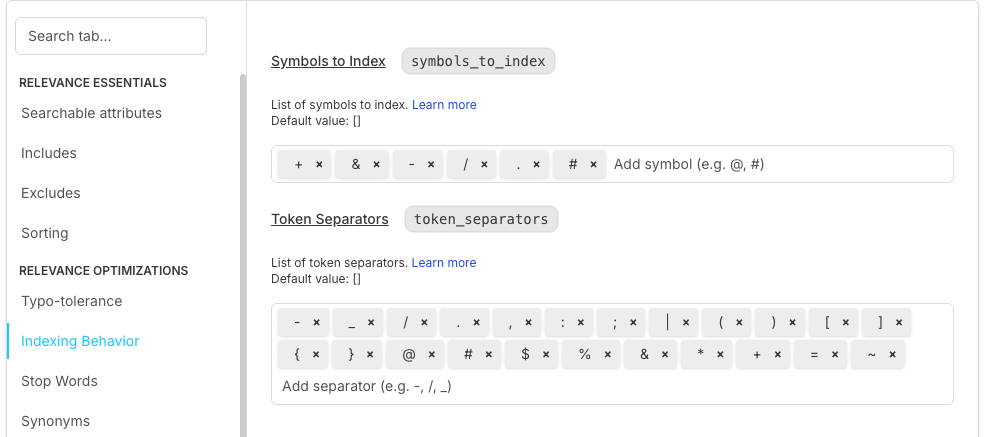
Indexing Behavior
Purpose: Control how data is processed and indexed for search.
Symbols to Index
Special characters to include (+, *, &, %, /, ?, #) in search indexing for enhanced matching
Token Separators
Characters that split words and define token boundaries for text processing
Indexing Strategy
How text is processed, tokenized, and prepared for search operations and retrieval
Configuration Option
Description
Add Symbol
Include special characters in search to enable matching of complex terms and symbols
Add Separator
Define word boundaries and customize how text is split into searchable tokens
Custom Rules
Advanced indexing logic and custom processing rules for specialized search requirements
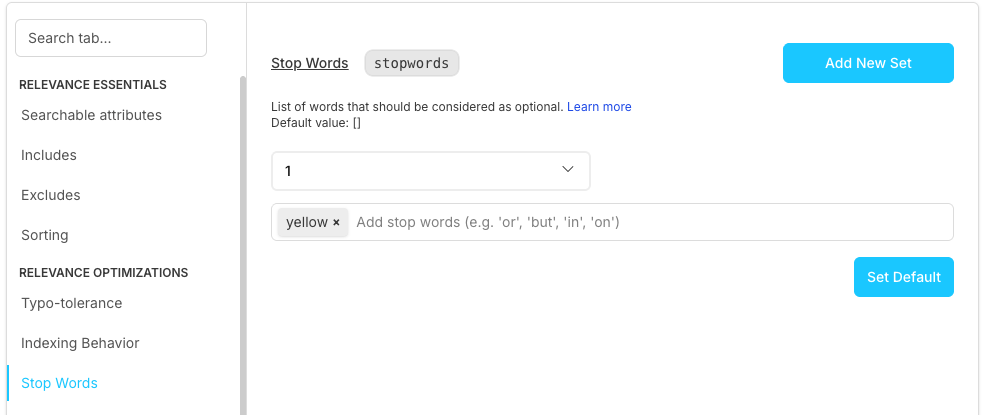
Stop Words
Purpose: Define words to ignore during search processing (manage comprehensive lists in Stopwords Management). Test stop word effects in Browse.
Predefined Sets
Common stop words ("the", "a", "an") that are automatically filtered from search queries
Custom Words
Project-specific terms to ignore based on business requirements and domain context
Language Support
Different sets per language to accommodate linguistic variations and cultural contexts
Management Option
Description
Working Test Set
Active stop word collection currently being used for search processing and filtering
Add Stop Words
Include new words to expand the stop word list and improve search relevance
Set Default
Apply stop word configuration to all searches across the entire system
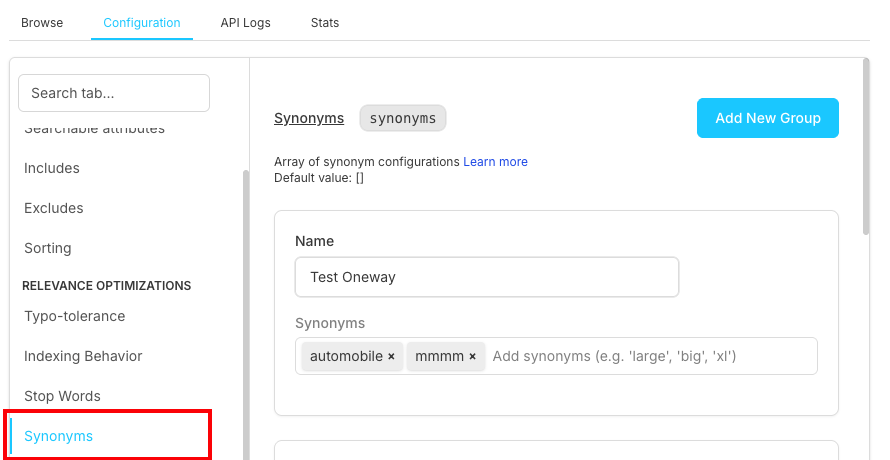
Synonyms
Purpose: Map alternative terms to improve search coverage.
Synonym Groups
Related terms ("automobile", "car", "vehicle") that expand search matching capabilities
Directional Mapping
One-way or bidirectional synonym relationships for flexible search term expansion
Custom Mappings
Business-specific terminology and domain-relevant synonym configurations
Management Option
Description
Add New Group
Create synonym groups to establish new term relationships and expand search coverage
Edit Groups
Modify existing mappings to refine synonym relationships and improve search accuracy
Test Synonyms
Verify behavior and validate synonym effectiveness before deployment to production
Filtering and Faceting
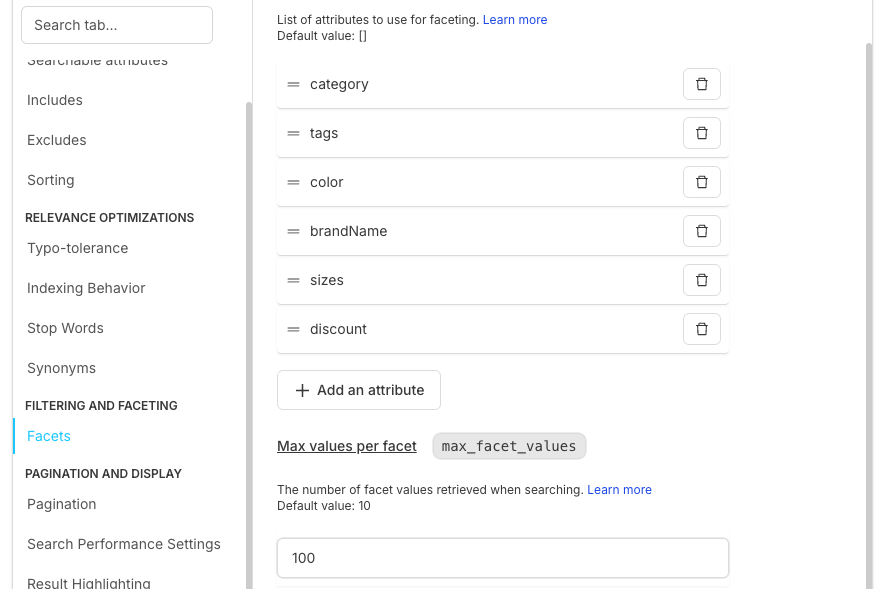
Facets Configuration
Purpose: Set up filter options for users to narrow search results.
Facet Attributes
Fields available for filtering to help users narrow down search results effectively
Max Values
Limit facet options displayed to prevent overwhelming users with too many choices
Facet Ordering
Priority and display order configuration to optimize user experience and relevance
category
Product categories for hierarchical filtering and organization
tags
Product tags and labels for flexible filtering and classification
color
Available colors for visual filtering and product variation selection
brandName
Brand filters for manufacturer-based product filtering and selection
sizes
Size options for dimensional filtering and product specification matching
discount
Discount ranges for price-based filtering and promotional product discovery
Configuration Option
Description
Add Attribute
Enable new facets to expand filtering capabilities and improve user experience
Max Facet Values
Control display limit (default: 10) to optimize performance and user interface clarity
Remove Facet
Disable faceting for specific attributes to simplify interface and reduce complexity
Pagination and Display
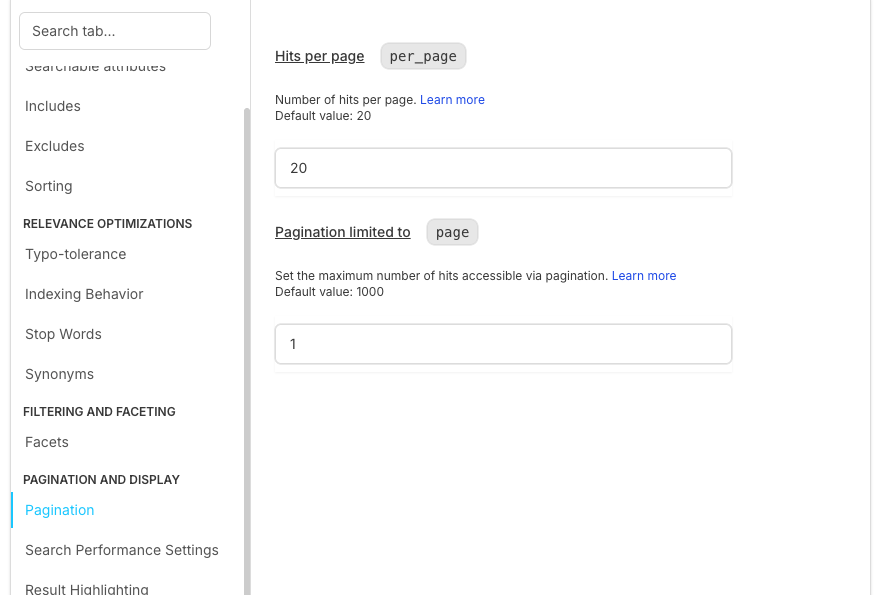
Purpose: Control how search results are paginated and displayed.
Hits per Page
Number of results per page (default: 20) to balance user experience and performance
Pagination Limited To
Maximum accessible results (default: 1000) to prevent deep pagination performance issues
Performance Consideration
Description
Page Size
Balance between user experience and performance to optimize loading times and usability
Deep Pagination
Limit deep pagination to prevent performance issues and maintain system responsiveness
Loading Strategy
Optimize for user experience with efficient loading patterns and progressive enhancement
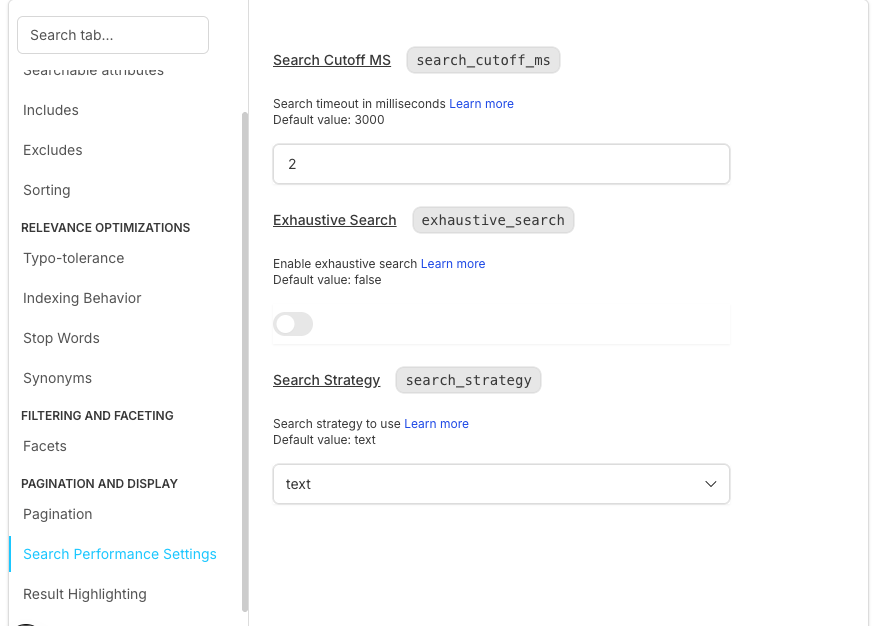
Purpose: Configure timeout and performance parameters (track trends in Stats).
Search Cutoff MS
Maximum search time in milliseconds (default: 3000) to prevent slow query performance
Exhaustive Search
Enable comprehensive search capabilities for thorough result retrieval and accuracy
Search Strategy
Algorithm selection (e.g., "text") for optimal search performance and relevance matching
Performance Tuning
Description
Timeout Management
Prevent slow queries from impacting system performance and user experience
Resource Allocation
Balance speed vs accuracy to optimize system resources and search quality
Algorithm Selection
Choose optimal search strategy for best performance characteristics and result quality
Result Highlighting
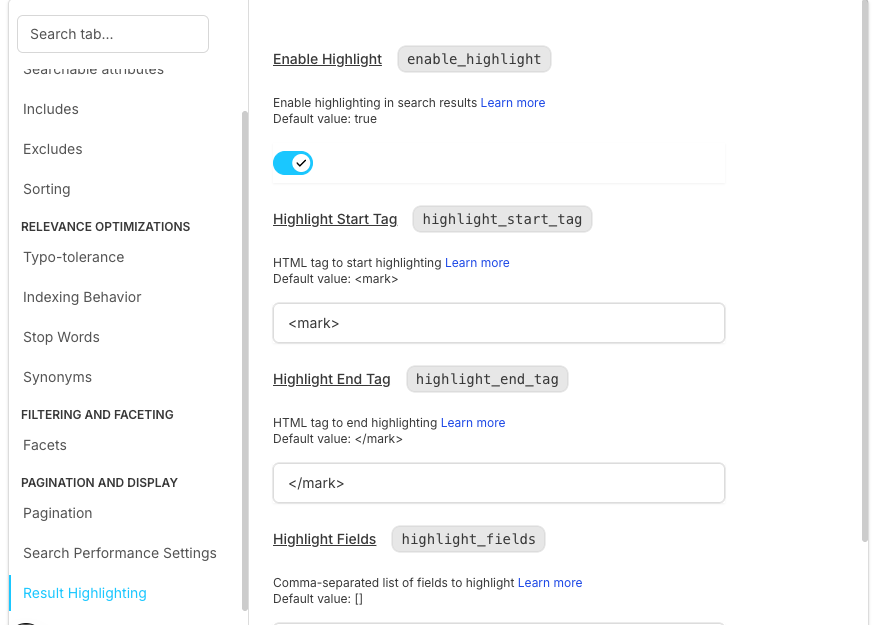
Purpose: Highlight search terms in results for better user experience.
Enable Highlight
Highlight matching terms to improve search result visibility and user experience
Highlight Start Tag
HTML tag to begin highlighting (default: <mark>) for customizable visual presentation
Highlight End Tag
HTML tag to end highlighting (default: </mark>) to complete the highlight markup
Highlight Fields
Specific fields to highlight for targeted search term emphasis and relevance indication
productName
Product titles for highlighting matched search terms in product names
brandDesc
Brand descriptions for emphasizing relevant brand information matches
color
Color names for highlighting color-specific search terms and variations
category
Category names for emphasizing category-related search matches
brand
Brand names for highlighting brand-specific search term matches
Configuration Best Practices
Searchable Attributes Optimization
Prioritize Important Fields
Put key attributes (brand, product name) first to maximize search relevance and ranking
Limit Searchable Fields
Too many searchable fields can reduce relevance by diluting search signal strength
Consider Field Types
Text vs numeric vs categorical fields have different search characteristics and optimization needs
Regular Review
Update searchable attributes based on search analytics and user behavior patterns
Common Configuration Workflows
Initial Setup
Define Searchable Attributes
Configure Includes/Excludes
Set Performance Parameters
Integration and Dependencies
Data Schema Alignment
Alignment Aspect
Description
Attribute Names
Must match actual product data fields to ensure proper search functionality and data mapping
Data Types
Configuration should match schema types for consistent data handling and processing
Field Availability
Ensure configured fields exist in data to prevent configuration errors and search failures
Update Coordination
Sync configuration with data changes to maintain consistency and prevent integration issues
Search API Integration
Integration Aspect
Description
Parameter Passing
Configuration affects API behavior and determines how search parameters are processed
Response Format
Includes/excludes configuration directly changes API response structure and content
Performance Impact
Settings affect API response times and overall system performance characteristics
Version Compatibility
Ensure configuration matches API version to prevent compatibility issues and feature conflicts
Notes
📌 Important Notice
Configuration Best Practices
Index Rebuilding
Configuration changes may require index rebuilding to take full effect
Performance Monitoring
Monitor performance after configuration updates to ensure optimal results
Backup Strategy
Keep backups of working configurations for quick rollback if needed
Frequently Asked Questions
How often should I update searchable attributes?
Update searchable attributes when you add new product fields or when search analytics show users are looking for information not currently searchable.
When should I use synonyms vs searchable attributes?
Use Synonyms when:
- You have alternative words for the same concept (car/automobile, sneakers/trainers)
- You want to expand search without changing the index structure
- Users search with different terminology for the same products
Use Searchable Attributes when:
- You want to control which data fields can be searched (product name, description, brand)
- You need to set different priorities/weights for different fields
- You want to structure what content is searchable vs just displayed
What fields should I highlight?
Highlight fields that users see directly: product names, descriptions, brand names. Avoid highlighting internal IDs or metadata.
Examples of fields to highlight:
- Product names: "Apple iPhone 15 Pro"
- Product descriptions: "Latest smartphone with advanced camera"
- Brand names: "Apple", "Samsung", "Nike"
- Categories: "Electronics", "Smartphones"
Examples of fields NOT to highlight:
- Internal IDs: "PROD_12345", "SKU_ABC123"
- Metadata: "created_at", "updated_at"
- System fields: "index_id", "sync_status"
How do I test configuration changes?
Use the Browse section to test searches with your new configuration. Check response times, relevance, and facet behavior before deploying.