QUERY SUGGESTIONS
What is Query Suggestions?
Query Suggestions is a feature that displays search recommendations to users as they type in the search bar. These are the dropdown suggestions that appear below the search input, helping users complete their search queries more effectively.
How it works: This intelligent feature analyzes user search patterns, analytics data, and your product catalog to automatically suggest relevant queries. It provides AI-powered recommendations that make the search experience more intuitive and efficient, helping users find what they're looking for faster. Monitor performance through Analytics.
Why Use Query Suggestions?
Query Suggestions improve user experience through various benefits:
| Benefit | Description | Impact |
|---|---|---|
| Reducing search time | Users see relevant suggestions instantly | Faster product discovery |
| Guiding discovery | Help users find products they didn't know exactly how to search for | Increased exploration |
| Correcting typos | Suggest correct terms even with misspellings | Better search accuracy |
| Showing popular searches | Display trending or frequently searched terms | Enhanced relevance |
| Category-based suggestions | Show suggestions organized by categories | Structured navigation |
Real-World Example: When a user types "wireless headphones", they instantly see suggestions like:
- wireless headphones bluetooth
- wireless headphones for running
- wireless headphones noise cancelling
- wireless headphones sony
Key Sections
Status and Overview
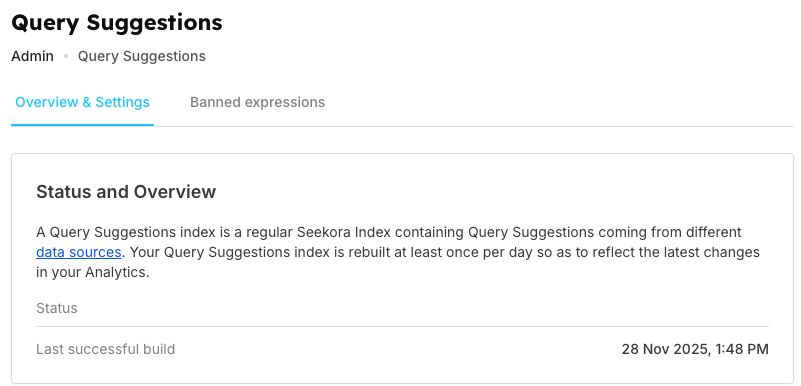
Displays the Query Suggestions index status and last successful build timestamp. The index is automatically rebuilt at least once per day to reflect the latest changes in your analytics and catalog. Monitor related performance in Stats.
Settings
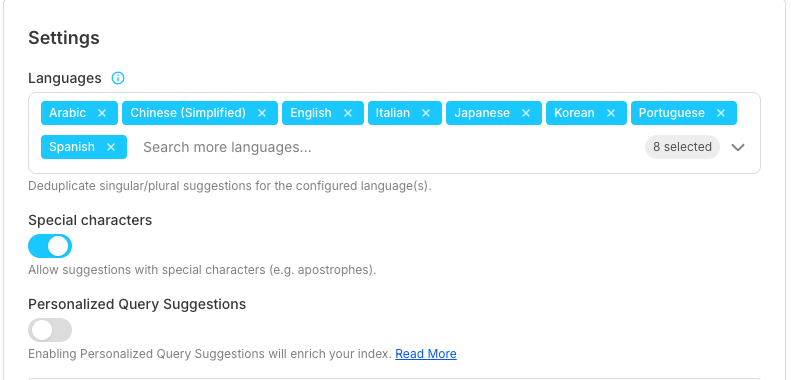
Configure global settings for query suggestions:
Configuration Settings:
| Category | Feature | Description | Use Case/Benefit |
|---|---|---|---|
| Languages | Language Selection | Select which languages to support | Multi-language support |
| Auto Deduplication | System automatically deduplicates singular/plural variations | Cleaner results | |
| Duplicate Prevention | Prevents showing both "shoe" and "shoes" as separate suggestions | Avoid redundancy | |
| Special Characters | Allow Special Characters | Toggle to allow/disallow special characters (apostrophes, etc.) | Natural language queries |
| Enable Mode | Enable for natural language like "men's shoes" | More conversational search | |
| Disable Mode | Disable for cleaner, simpler suggestions | Streamlined experience | |
| Personalized (AI-Powered) | User-Specific Recommendations | Enable to provide user-specific recommendations | Tailored experience |
| Pattern Learning | AI learns from individual search and click patterns | Smarter suggestions | |
| Relevance Improvement | Improves relevance for returning users | Better user retention |
Data Sources
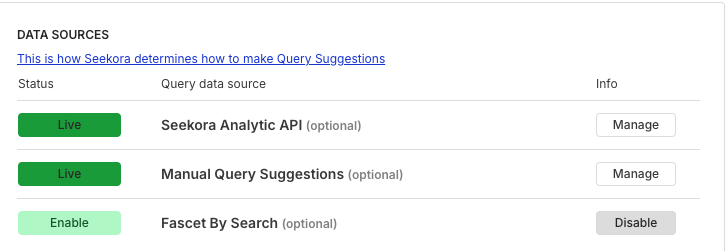
Control where your query suggestions come from:
| Data Source | Type | Features | Benefits |
|---|---|---|---|
| Seekora Analytic API | AI-Driven | Generates suggestions from actual user search queries | Real user behavior insights |
| Shows popular and trending searches | Current market trends | ||
| AI analyzes real analytics data for smart recommendations | Intelligent suggestions | ||
| Manual Query Suggestions | Optional | Add custom suggestions manually | Full customization control |
| Promote specific products or campaigns | Marketing flexibility | ||
| Full control over promotional terms | Strategic positioning | ||
| Facet By Search | Optional | Generates suggestions from catalog facets | Catalog-based accuracy |
| Suggests category and brand names | Structured navigation | ||
| Matches your catalog structure (view in Browse) | Consistent organization |
Each source can be enabled/disabled independently. Click "Manage" to configure individual suggestions within each source.
Categories
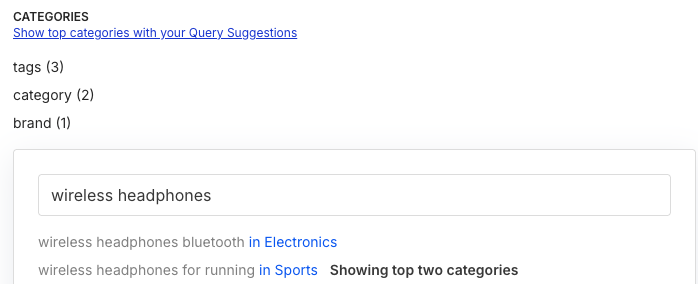
Control how suggestions are organized by category:
Category Configuration:
- Define which attributes to use for categorization (tags, category, brand)
- Set how many top categories to display
Example:
- Search "wireless headphones" → Shows results categorized by "Electronics", "Sports", etc.
Advanced Settings
Minimum Letters:

- Set how many characters users must type before seeing suggestions
- Default: 1 (instant suggestions)
- Increase for large catalogs to reduce noise
Minimum Hits:

- Filter out suggestions with too few search results
- Default: 1 (show all)
- Increase to show only popular, high-quality suggestions
How It Works
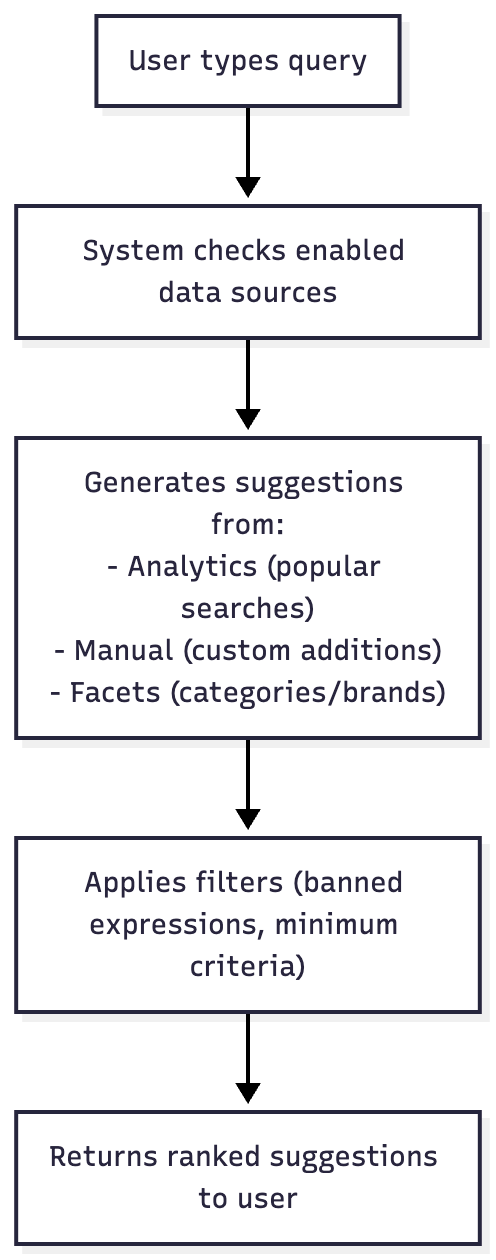
Workflow Diagram:
Key Features
Key Management Features
| Section | Feature | Description | Purpose/Benefit |
|---|---|---|---|
| Manage Query Suggestions | Analytics View | View analytics for auto-generated suggestions (detailed analysis in Analytics) | Monitor performance |
| Manual Management | Add/edit/delete manual suggestions | Custom control | |
| Individual Control | Enable/disable individual suggestions | Fine-tuned management | |
| Priority Setting | Set priorities for manual suggestions | Ranking control | |
| Performance Tracking | Track popularity and performance | Data-driven insights | |
| Banned Expressions | Term Blocking | Block offensive or unwanted terms | Content safety |
| Pattern Matching | Use exact match, prefix, or regex patterns | Flexible filtering | |
| Instant Effect | Immediate effect on suggestions | Real-time control | |
| Quality Control | Maintain quality and appropriateness | Brand protection |
Frequently Asked Questions
How often are suggestions updated?
The Query Suggestions index rebuild frequency is based on your plan, typically at least once per day. Check the "Last successful build" timestamp in the Status section to see when your suggestions were last updated. Monitor build activities in API Logs.
What happens if all data sources are disabled?
No suggestions will be generated. You must have at least one data source enabled.
Do banned expressions affect search results?
No, only suggestions. Banned expressions don't affect actual search results users see after searching.
How do I prioritize certain suggestions?
Use Manual Query Suggestions and set higher priority values (90-100) for top promotional terms.
Next Steps
- Manage Query Suggestions: View analytics and manage manual suggestions
- Banned Expressions: Block unwanted terms from suggestions
- Analytics: Analyze user search patterns and suggestion performance
- Configuration: Optimize search settings for better suggestion relevance