BANNED EXPRESSIONS
Overview
Banned Expressions allows you to block specific words or phrases from appearing as query suggestions. This is essential for maintaining quality and appropriateness in your search suggestions by filtering out unwanted, offensive, or irrelevant terms. This feature works in conjunction with your overall store configuration
Why Use Banned Expressions?
Banned expressions help you:
- Remove offensive content - Block inappropriate or profane terms
- Filter irrelevant queries - Remove nonsense or spam queries
- Protect brand reputation - Prevent negative or sensitive terms
- Improve suggestion quality - Keep only relevant, useful suggestions
- Comply with policies - Meet content standards and regulations
- Enhance user experience - Works with search interface optimization
Real-World Example: If users are searching for offensive terms or your system is suggesting irrelevant queries like random character strings, you can ban them permanently so they never appear in suggestions.
Accessing Banned Expressions
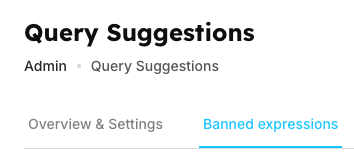
Tabs on the page:
- Overview & Settings
- Banned expressions (current tab)
Navigate between these tabs to configure your complete query suggestions system.
Page States
Empty State
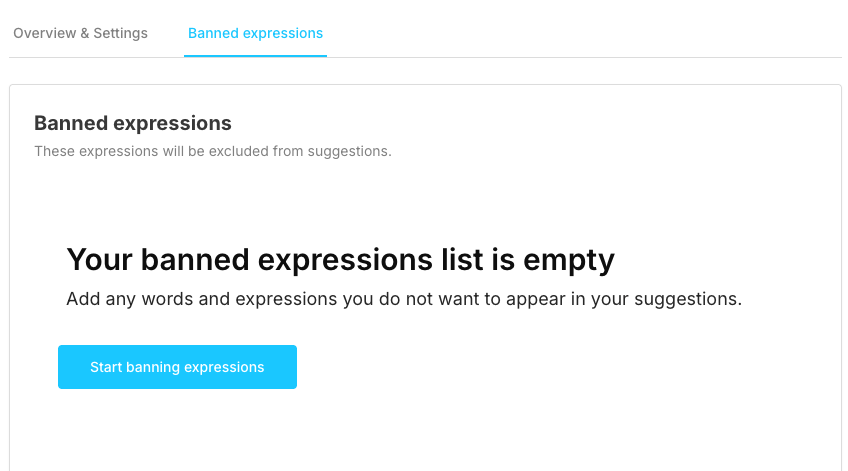
When you first visit or have no banned expressions:
Action: Click the button to add your first banned expression.
Active State (With Banned Expressions)
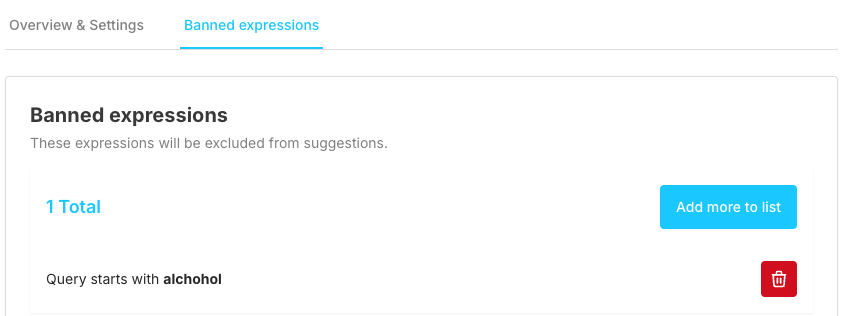
When you have banned expressions in the list:
Action Button:
- "Add more to list" (cyan button, top right)
- Click to add additional banned expressions
Banned Expressions List
Condition Types
| Condition Type | Blocking Method | Description | Example |
|---|---|---|---|
| Query is | Exact match blocking | Blocks the specific query exactly as written | Ban "fghj" → blocks only "fghj" |
| Query starts with | Prefix-based blocking | Blocks any query starting with the specified text | Ban "vbfg" → blocks "vbfg", "vbfgxyz", "vbfg123" |
| Matched regExp | Regular expression pattern matching | Advanced blocking using regex patterns | Ban "kj" → blocks any query matching the pattern |
Expression Input Configuration
| Field | Details | Validation | Examples |
|---|---|---|---|
| Label | Text input field (right side) | Cannot be empty, Must be valid (for regex patterns) | Field for entering banned expressions |
| Placeholder | "e.g. cocaines" | Visual guide for users | Shows example of what to enter |
| Purpose | Enter the word, phrase, or pattern to ban | Required field for all condition types | Core functionality for blocking unwanted queries |
| Query is Examples | Input: inappropriate-term | Exact match validation | Result: Blocks exact match "inappropriate-term" |
| Query starts with Examples | Input: bad | Prefix validation | Result: Blocks "bad", "badword", "badly", etc. |
| Matched regExp Examples | Input: ^test.*$ | Regex pattern validation | Result: Blocks any query starting with "test" |
Description Text
Text: "Include a rule to remove unwanted queries"
Purpose: Reminds you what this feature does
Action:
- Adds the expression to the banned list
- Closes the dialog
- Updates the total count
- Expression takes effect immediately
Managing Banned Expressions
Deletion Process
| Step | Action | Description | Result |
|---|---|---|---|
| 1 | Locate the expression | Find the expression in the list | Expression identified for removal |
| 2 | Click red delete button | Click the trash icon on the right | Deletion initiated |
| 3 | Immediate removal | Expression is removed immediately (no confirmation dialog) | Expression deleted from system |
| Result | System updates | Expression is deleted permanently, total count updates, users can now see this query in suggestions again |
How Banned Expressions Work
Processing Flow
User types search query
    ↓
System checks banned expressions list
    ↓
Does query match any banned expression?
    ├─ YES → Don't show as suggestion
    └─ NO → Show in suggestions (if meets other criteria)
This process integrates with your search configuration and affects what users see in the browse interface.
Matching Logic
Query is (Exact):
Banned: "test"
Blocks: "test"
Allows: "testing", "Test", "test123"
Query starts with (Prefix):
Banned: "test"
Blocks: "test", "testing", "test123", "testuser"
Allows: "my test", "atest"
Matched regExp (Pattern):
Banned: "test.*"
Blocks: "test", "testing", "test123", "testanything"
Allows: "my test", "atest"
Content Guidelines
| Category | Items to Ban | Items to Avoid Banning | Reason | Best Practice |
|---|---|---|---|---|
| Language Content | Offensive or profane language | Legitimate product names | Maintain appropriate content standards | Regular review and community feedback |
| Adult Content | Inappropriate adult content terms | Common search terms | Comply with content policies and user safety | Use comprehensive term lists |
| Quality Control | Spam or gibberish (like "asdfasdf", "fghj") | Queries with high search volume | Improve suggestion relevance | Pattern-based blocking for efficiency |
| Business Strategy | Competitor brand names (if needed) | Variations you haven't tested | Protect business interests | Careful consideration of business impact |
| Policy Compliance | Sensitive topics that violate policies | - | Meet regulatory requirements | Legal and policy team consultation |
| User Experience | Known problematic queries | - | Maintain positive user experience | Data-driven decision making |
Condition Type Selection Guide
| Condition Type | Best Used When | Use Cases | Example Scenario | Benefits |
|---|---|---|---|---|
| Query is | You know the exact offensive term | Simple one-word blocks, Most common use case | Ban exact term "badword" | Precise control, easy to implement |
| Query starts with | Blocking a family of related terms | Catching variations (plural, suffixes) | "porn" blocks "porn", "pornography", "porns" | Efficient for related term families |
| Matched regExp | Complex pattern matching needed | Multiple variations with one rule, Advanced filtering requirements | Block all queries with 10+ consecutive numbers | Powerful pattern matching, single rule for complex cases |
Common Use Cases
| Use Case | Recommended Condition | Approach | Example Configuration |
|---|---|---|---|
| Block Offensive Content | Query is | Use exact matches for known offensive terms, add variations manually, regular review and updates | Query is: offensive-term-1Query is: offensive-term-2Query is: offensive-term-3 |
| Block Spam/Gibberish | Matched regExp | Use regex patterns to catch random character combinations and keyboard mashing | Matched regExp: ^[a-z]{1,3}$(Blocks very short meaningless queries like "a", "bb", "ccc") |
| Block Competitor Brands | Query starts with | Use prefix matching to catch variations, block brand name and common misspellings | Query starts with: competitor-brand(Blocks "competitor-brand", "competitor-brand-shoes", etc.) |
| Block Adult Content | Multiple conditions | Comprehensive list using exact matches, add variations and misspellings, regular expressions for patterns | Query is: adult-termQuery starts with: xxxMatched regExp: (adult|porn|xxx).* |
System Behavior
| Behavior | Details | Impact | Important Notes |
|---|---|---|---|
| Immediate Effect | Banned expressions take effect immediately | No delay or index rebuild needed, users won't see banned queries instantly | Real-time blocking implementation |
| Case Sensitivity | Generally case-insensitive (depends on implementation) | "Test" and "test" typically treated the same, follows search configuration settings | Use regex for case-sensitive blocking if needed |
| No Undo | Deleting an expression is permanent | No confirmation dialog | Careful consideration required before deletion |
- Must re-add if deleted by mistake
Performance
- Many banned expressions don't slow down suggestions
- Efficient matching algorithms
- Safe to add hundreds of expressions
Frequently Asked Questions (FAQs)
How quickly do banned expressions take effect?
Immediately. As soon as you click "Save", the expression is active and will block matching queries from suggestions.
Can I ban partial words or phrases?
Yes, use "Query starts with" for prefixes or "Matched regExp" for more complex partial matching.
What happens to existing suggestions that match a new ban?
They are immediately filtered out and won't appear to users anymore. However, if the suggestion exists in Analytics, it will still show there (but marked as unavailable).
Do banned expressions affect search results or just suggestions?
Only suggestions. Banned expressions don't affect the actual search results users see after searching. The actual search functionality remains in Browse interface.
Should I use exact matches or regex?
Start with exact matches ("Query is") for simplicity. Use regex only when you need pattern matching for multiple variations.
How many expressions can I ban?
The number of banned expressions you can add depends on your plan. You can add multiple expressions without experiencing performance issues, as the system uses efficient matching algorithms.
Can I ban multi-word phrases?
Yes, enter the full phrase in the expression input. Example: "inappropriate phrase here"
What if I accidentally ban a legitimate query?
Simply delete the expression from the list. The query will immediately become available in suggestions again.
Do banned expressions work across all languages?
Yes, they work for any language. Ban the expression in the specific language you want to block.
Related Features
- Analytics: Monitor which queries are popular (some might need banning)
- Manual Query Suggestions: Opposite of banning - actively promote queries
- Overview: Configure overall suggestion behavior
- Configuration: Control search behavior and content policies