Orders
Overview
Invoices Management lets you view, download, and organize all invoices and receipts for your Seekora account, helping you maintain clear and accurate financial records.
Orders Table Structure
The Orders section presents a structured table containing all relevant order information for easy review.

| Field | Order ID | Amount | Status | Payment Type | Gateway | Actions |
|---|---|---|---|---|---|---|
| Description | Unique identifier for each transaction | Payment amount in local currency | Current payment status | Method of payment used | Payment processor used | Available operations for each order |
| Sample Value | 380 | 4150 INR | Paid | Subscription | Razorpay | View, Download, Refund |
| Purpose | Transaction tracking and reference | Financial record keeping | Payment verification | Payment method tracking | Transaction routing information | Order management functions |
Gateway Features
Each gateway provides:
- Secure Processing: PCI-compliant payment handling
- Multiple Payment Methods: Cards, wallets, bank transfers
- Real-time Status Updates: Instant payment confirmation
- Automatic Retry: Failed payment recovery mechanisms
Order History Management
Transaction Records & Historical Data Access
When you will click on action button.
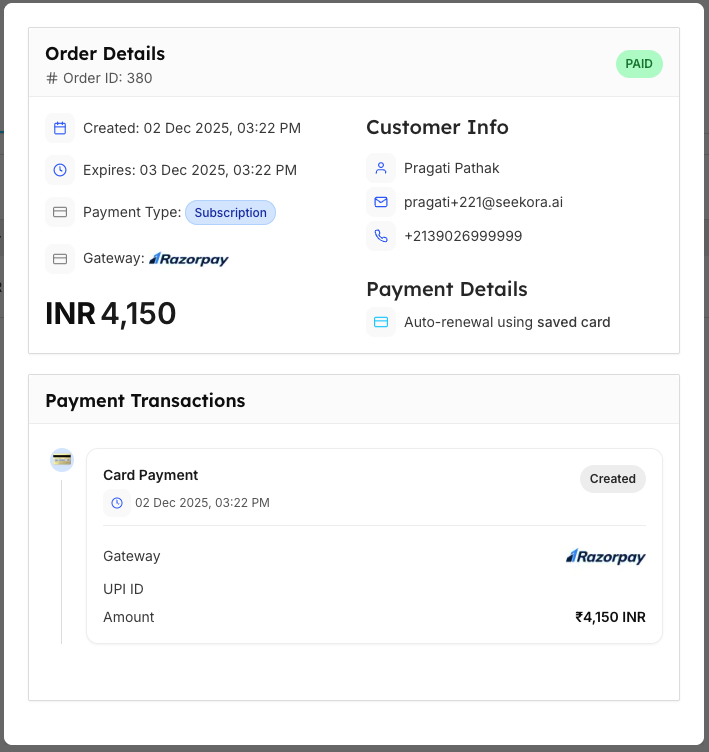
| Category | Feature | Description | Example/Options |
|---|---|---|---|
| Transaction Records | Complete Transaction Log | All payment attempts and outcomes (detailed in Activity Logs) | Success, Failed, Pending, Cancelled |
| Timestamp Tracking | Precise order creation and completion times | UTC timestamps with duration | |
| User Attribution | Who initiated each order (see User Management) | User ID, Email, Account details | |
| Amount Tracking | Payment amounts and currency information | INR, USD, EUR with rates | |
| Historical Data Access | Pagination | Navigate through large order volumes | Page 1 of 1 shown |
| Rows per Page | Configurable display options | 10, 25, 50, 100 (50 default) | |
| Export Options | Download order history for accounting | CSV, Excel, PDF formats | |
| Search History | Find specific historical transactions | Order ID, Date, Amount filters |
Comprehensive Order History
Comprehensive order history includes all the above features to provide complete visibility into:
- All payment attempts and their outcomes with detailed logging
- Precise timing information for audit and reporting purposes
- User tracking for accountability and behavior analysis
- Multi-currency support with real-time exchange rate tracking
- Flexible data access with pagination and export capabilities
- Advanced search and filtering for quick transaction lookup
Order Monitoring
Real-time Updates & Payment Analytics
| Monitoring Type | Feature | Description | Frequency |
|---|---|---|---|
| Real-time Updates | Live Status Updates | Real-time payment processing status | Instant |
| Notification Integration | Alerts for payment confirmations (via Notifications System) | Immediate | |
| Dashboard Integration | Order status reflected in billing overview | Real-time | |
| Email Confirmations | Automatic payment confirmation emails (configure in Notifications) | Auto-send | |
| Payment Analytics | Success Rates | Percentage of successful payments | Daily |
| Gateway Performance | Comparison of different payment processors | Weekly | |
| Payment Method Analysis | Most successful payment types | Monthly | |
| Failure Analysis | Common payment failure reasons | Continuous |
Security & Compliance Benefits
The comprehensive security and compliance framework ensures:
- Industry Standards: Full PCI compliance and encryption protocols protect all payment data
- Regulatory Adherence: Complete compliance with financial regulations and data protection laws
- Risk Mitigation: Advanced fraud detection and multi-factor authentication prevent unauthorized access
- Audit Readiness: Comprehensive logging and automated reporting support regulatory audits
Related Features
Billing Management
- Usage Details - Monitor billing dashboard and API usage patterns
- Invoices Management - Download and organize payment receipts
- Alerts Management - Set up billing and payment notifications
System Integration
- User Management - Configure user roles and payment permissions
- Notifications - Manage payment confirmation emails and alerts
- Activity Logs - Review detailed transaction and payment logs