Overview
The Searches without Clicks analytics provides crucial insights into search queries that generated results but didn't lead to user engagement. For information about filtering options, see Overview - Filter Options. This data is essential for identifying gaps in your search experience, product catalog issues, and opportunities for optimization. Understanding why users search but don't click helps improve both search relevance and product presentation.
Why Monitor Searches without Clicks?
Searches without clicks indicate potential problems in your search experience:
- Poor Search Results - Results may not match user intent
- Missing Products - Users searching for unavailable items (see Searches without Results for zero-result queries)
- Poor Product Presentation - Results exist but aren't appealing
- Relevance Issues - Correct products buried in results
- Category Gaps - Missing product categories or variants
Business Impact:
High searches without clicks directly impact conversion rates and revenue. Every search without engagement represents a lost sales opportunity and potential customer frustration. For comprehensive revenue impact analysis, see Searches without Results - Revenue Impact Assessment.
Key Metrics and Data Points
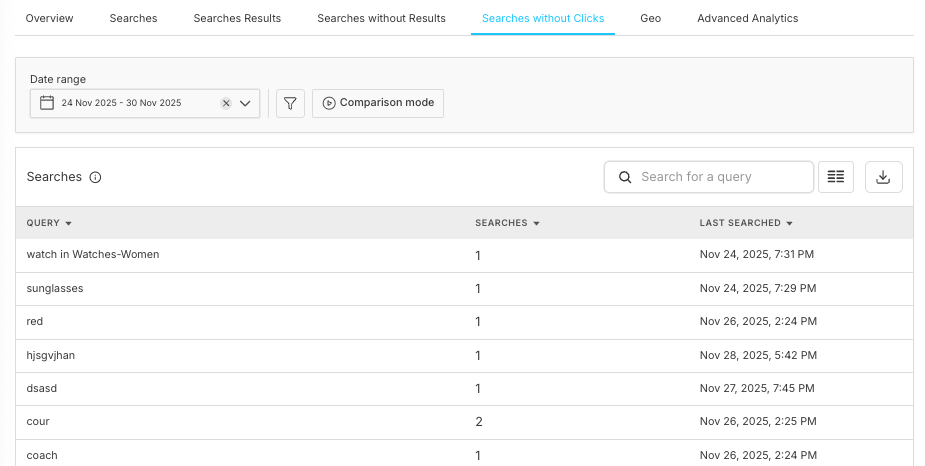
1. Search Query Analysis Table
Core Columns
• Query: The actual search terms users entered
• Searches: Number of times the query was searched
• Last Searched: Most recent occurrence of the search
Sample Data Insights
• zipper - 1 search, Last: Oct 29, 2025, 1:51 PM
• yoga mat - 66 searches, Last: Nov 24, 2025, 5:05 AM
• Yellow coke- 5 search, Last: Dec 1, 2025, 4:37 PM
Compare with
overall search volume metrics for context.
Search Volume
Total number of searches without clicks
Query Frequency
How often specific terms are searched
Time Patterns
When searches occur most frequently
Recency Data
Latest occurrence of each query
Detailed Analytics Components
Search Query Details Modal
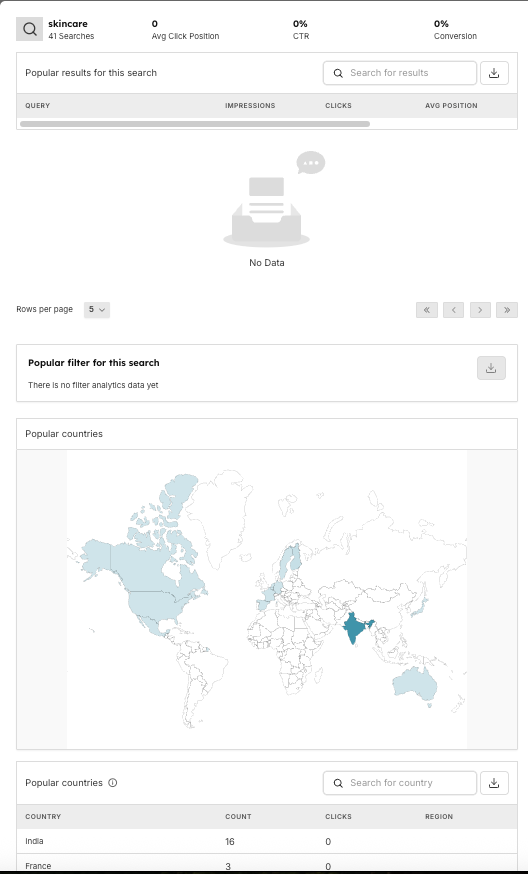
Search Overview
When clicking on a specific search query, you get detailed insights:
•
Query: "skincare" (example)
•
Total Searches: 0 in selected period
•
Average Click Position: 0% (no clicks)
•
Click-through Rate: 0% (no engagement)
•
Conversion: 0% (purchase conversion)
Cross-reference with
Searches - Conversion Analysis for benchmarking.
Popular Results Section
Shows what results appeared for this search:
•
Impressions: How many times products were shown
•
Clicks: User interactions with results
•
Average Position: Where products appeared in results
For detailed product-level analysis, see
Searches Results - Position Analysis.
Regional Analytics
•
Country Breakdown: Search origin by country
•
Geographic Patterns: Regional search behavior
•
Popular Countries Table: - India: 2 searches, 0 clicks (Reasons column available)
- Japan: 1 search, 0 clicks (Tokyo region)
- Finland: 1 search, 0 clicks (Uusimaa region)
Compare with
Searches without Results - Geographic Analysis for regional market opportunities.
Results Analysis
• No Data Message: "No Data" indicates no results were found
• Pagination: Browse through different result sets
• Results per Page: Configurable display options (50+ items)
Key Analysis Categories
Query Type
Common Causes
Actions to Take
Zero Results Queries
• Product not in catalog
• Misspelled product names
• Incorrect category searches
• Seasonal/discontinued items
Poor Relevance Queries
• Irrelevant search results
• Poor ranking algorithms
• Missing product information
• Unappealing product presentations
Category Mismatch Queries
• Confusing navigation structure
• Poor category labeling
• Missing cross-category products
• Inadequate search guidance
High-Volume No-Click Queries
• Popular products out of stock
• Pricing issues
• Competitive disadvantage
• Poor product positioning
• Stock popular items
• Review pricing strategy
• Improve product positioning
• Create promotional campaigns
Regional and Geographic Analysis
Analysis Type
Details & Metrics
Country-Level Insights
Track searches without clicks by geographic location:
Key Metrics:
• Search Count: Total searches per country
• Click Count: Engagement levels by region
• Reasons: Specific causes for lack of engagement
• Regional Preferences: Local market behavior patterns
Geographic Optimization
•
Localized Content: Adapt products for regional preferences
•
Currency Considerations: Pricing for local markets
•
Shipping Options: Regional delivery capabilities
•
Cultural Factors: Local shopping behaviors
For market expansion strategies, see
Searches without Results - Regional Market Gaps.
Time Zone Analysis
• Peak Search Hours: When users search most
• Regional Patterns: Different peak times by location
• Seasonal Trends: Geographic seasonal variations
• Market Timing: Optimal engagement windows
Optimization Strategies
Timeline
Strategy
Action Items
Immediate
Identify Top Problem Queries
• Focus on highest volume searches without clicks
• Prioritize recent and recurring searches
• Address zero-results queries first
Immediate
Quick Wins
• Fix obvious spelling variations
• Add missing popular products
• Improve product titles and descriptions
• Optimize product images
• Use
Rules Management for immediate fixes
Immediate
Search Enhancement
• Implement autocomplete suggestions
• Add "did you mean" functionality
• Create search result explanations
• Improve filtering options
Medium-Term
Catalog Expansion
• Add products for high-demand searches
• Create product bundles
• Source seasonal items
• Expand category coverage
Medium-Term
Search Algorithm Tuning
• Adjust relevance scoring
• Improve synonym matching
• Enhance typo tolerance
• Optimize ranking factors
Medium-Term
User Experience Enhancement
• Redesign search results layout
• Improve product information display
• Add comparison features
• Implement personalization
Long-Term
Predictive Analytics
• Forecast search trends
• Anticipate seasonal demands
• Identify emerging categories
• Plan inventory accordingly
Long-Term
Machine Learning Integration
• Implement AI-powered search
• Use behavioral learning
• Personalize search results
• Automate optimization
Key Performance Indicators
• No-Click Rate: Percentage of searches without engagement
• Query Resolution Rate: Successful search completions
• Regional Performance: Geographic engagement patterns
• Trend Analysis: Month-over-month improvements
Monitoring Frequency
• Daily: High-impact query monitoring
• Weekly: Trend analysis and pattern identification
• Monthly: Strategic review and planning
• Quarterly: Major optimization initiatives
Alert Thresholds
• Spike Detection: Unusual increases in no-click searches
• Zero Results: New queries with no results
• Regional Issues: Geographic performance drops
• Seasonal Changes: Expected vs actual patterns
Best Practices
Practice Category
Best Practices & Guidelines
Data Collection
• Consistent Tracking: Ensure all searches are captured
• Clean Data: Remove bot traffic and test searches
• Regular Validation: Verify data accuracy
• Historical Preservation: Maintain long-term trends
Analysis Methodology
• Segment Analysis: Break down by user types, regions, devices
• Cohort Studies: Track user behavior over time
• A/B Testing: Validate optimization efforts
• Benchmark Comparison: Industry and historical standards
Action Planning
• Prioritization Matrix: Impact vs effort analysis
• Resource Allocation: Team and budget planning
• Timeline Management: Short, medium, long-term roadmaps
• Success Metrics: Clear optimization goals
Cross-Functional Applications
Product Management
Regional Demand
Geographic patterns inform inventory decisions
Market Adaptation
Product mix optimization for regional preferences
Pricing Strategy
Geographic pricing and competitive positioning
Launch Planning
Regional rollout strategies for new products
Customer Success
Support Optimization
Regional support team allocation
Language Services
Multi-language customer service priorities
Response Times
Regional service level agreements
Cultural Training
Regional customer service best practices
Technical Operations
Technical Area
Implementation
Infrastructure Scaling
Regional server and CDN optimization
Performance Monitoring
Geographic performance tracking
Compliance Management
Regional regulatory and legal compliance
Security Considerations
Regional security and privacy requirements
Notes
📌 Important:
- No-click searches are normal but should be minimized
- Geographic variations require localized strategies
- Regular monitoring prevents major issues
- Integration with other analytics provides complete picture
- Action on insights is more important than data collection
Frequently Asked Questions
Why do regional patterns vary so much?
Regional differences can be due to product availability, cultural preferences, local competition, pricing, shipping options, and seasonal variations.
How often should I review this data?
Check high-level metrics daily, analyze trends weekly, and conduct deep optimization reviews monthly.
How do I measure optimization success?
Track improvements in click-through rates, conversion rates, user satisfaction scores, and reduction in no-click search volumes over time.
Should I worry about all no-click searches?
No, focus on high-impact queries. Some searches are naturally informational or comparison-based and may not lead to immediate clicks.
Core Analytics
Configuration & Testing
Management & Monitoring